Controleer voordat u productadvertenties plaatst of de productgegevens overeenkomen met de landingspagina.
Productadvertenties tonen doorgaans afbeeldingen, productnamen en prijzen tegelijk, waardoor gebruikers een duidelijk beeld hebben van wat ze kunnen verwachten wanneer ze erop klikken.
Productadvertenties tonen doorgaans afbeeldingen, productnamen en prijzen tegelijk, waardoor gebruikers een duidelijk beeld hebben van wat ze kunnen verwachten wanneer ze erop klikken. Controleer de varianten, voorraad en prijzen die in elke advertentie worden vermeld om ervoor te zorgen dat deze overeenkomen met de pagina waarop het product wordt weergegeven.
Analyseer impressies, klikken, verkopen en advertentiekosten per productgroep, met speciale aandacht voor artikelen met veel klikken maar weinig verkopen. Verhoog het budget pas nadat ongeldige afbeeldingen, verouderde informatie en incompatibele specificaties zijn gecorrigeerd.
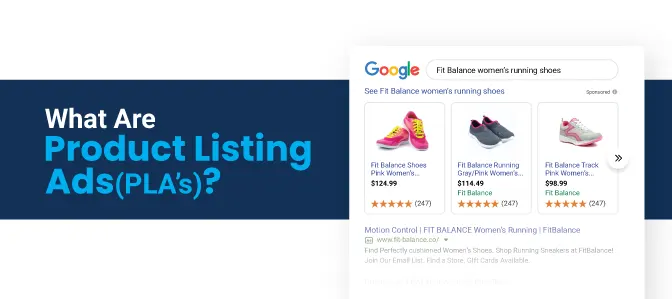
Product Listing Ads (PLAs) are a common advertising strategy for e-commerce players. If you’ve ever done a Google Search for a product, paid ads (usual websites) are listed at the top of the page with organic searches displayed below. A small ‘Ad’ will show next to the ad results at the top of the page (see example below).
Google allows merchants to purchase ads for specific products on their websites now. You’ll notice these Product Listing Ads (PLAs) to the right of search results (see below):
PLAs have made it easier for consumers to shop by allowing them to view products from the search page.
Because consumers can view multiple listings and prices on the search page, competition has increased for online retailers. Merchants' most popular products are typically shown on these PLAs. This is to encourage click-through rates and to remain competitive.
PLAs are most commonly displayed in the "Shopping" section of Google searches. Because thousands of products are now displayed on Google Shopping, PLAs are a key way for merchants to stand out to browsers.
How to Use PLAs
Many can collect product reviews directly on their website, but that doesn't mean syndication to Google. You can partner up with a third-party review aggregator (like Shopper Approved) that has syndication contracts with Google, and syndicate through them. This puts Google Seller Ratings and Reviews and product reviews in front of more people and is proven to increase conversion rates.
Amazon Is Exploring PLAs
While PLAs increase may drive down prices to more competitive rates for consumers and make it easy to find what they are looking for, those same benefits are the merchant’s trials. Especially since Amazon has started exploring Google PLAs.
“If Amazon decides to fully invest in PLAs for the long term at similar return-on-investment targets as other e-commerce advertisers, it will be a big win for Google,” says Mark Ballard, senior director, and researcher at Merkle.
Amazon’s push into PLAs means that their results will show up in searches and in Google Shopping results.
"Amazon's entrance into Google Shopping will undoubtedly have a major impact on online retailers. As a paid traffic source, Google Shopping has been the most effective ad unit for our clients and oftentimes their biggest source of new customers,” Nolan Antonucci, performance manager at Exclusive Concepts claims.
How can you make your PLAs stand out? Google allows star ratings to display for the products being featured if the seller ratings meet certain criteria. s must have at least 50 reviews across all of their products, and the product listed must have at least 3. These ratings may be the differentiator to take on Amazon and other online retailers in this space.
Look at the google product rating page here to get more information on PLA requirements.